AI integrations
MCP server
Connect to the Blnk MCP server to query and manage ledger data from AI tools.
POST
/
mcp
/
{instance_id}
{
"mcpServers": {
"blnk": {
"url": "https://api.cloud.blnkfinance.com/mcp/YOUR_INSTANCE_ID",
"headers": {
"X-blnk-key": "CLOUD_API_KEY"
}
}
}
}
The Blnk MCP server exposes your Core instance through the Model Context Protocol (MCP).
AI tools such as Cursor, Claude Desktop, and ChatGPT connect to this endpoint, authenticate with Blnk Cloud credentials, and call tools to read or write ledger data.
All MCP traffic is routed through Blnk Cloud. AI clients never connect directly to your Core instance. Cloud validates credentials, enforces scopes, and forwards authorized operations to the target instance.

{
"mcpServers": {
"blnk": {
"url": "https://api.cloud.blnkfinance.com/mcp/YOUR_INSTANCE_ID",
"headers": {
"X-blnk-key": "CLOUD_API_KEY"
}
}
}
}
Set up your client
1
Create authentication credentials
Choose either an API key or OAuth credentials. Both need
mcp:read and mcp:write.- API Key
- OAuth Credentials
Create an API key with MCP scopes in Settings > API Keys.
Create an OAuth client with MCP scopes in Settings > API Keys. Select
OAuth as the type when creating.2
Get your MCP endpoint
Go to
Settings > MCP and copy the configuration for your app.- API Key
- OAuth Credentials
{
"mcpServers": {
"blnk": {
"url": "https://api.cloud.blnkfinance.com/mcp/YOUR_INSTANCE_ID",
"headers": {
"X-blnk-key": "CLOUD_API_KEY"
}
}
}
}
https://api.cloud.blnkfinance.com/mcp/YOUR_INSTANCE_ID
For OAuth, you only need the MCP endpoint URL. Use your OAuth Client ID and Client Secret for authentication.
3
Configure your MCP client
- Cursor
- Claude Desktop
- ChatGPT
- Open Cursor Settings.
- Go to
Features > MCP Servers. - Click
Add Server. - Paste the configuration from the previous step (full JSON for API keys, or the endpoint URL for OAuth).
Add the configuration from the previous step to
claude_desktop_config.json:~/Library/Application Support/Claude/claude_desktop_config.json
%APPDATA%\Claude\claude_desktop_config.json
- Go to
Settings > Apps.

- Open
Advanced settingsand enableDeveloper mode. - Click
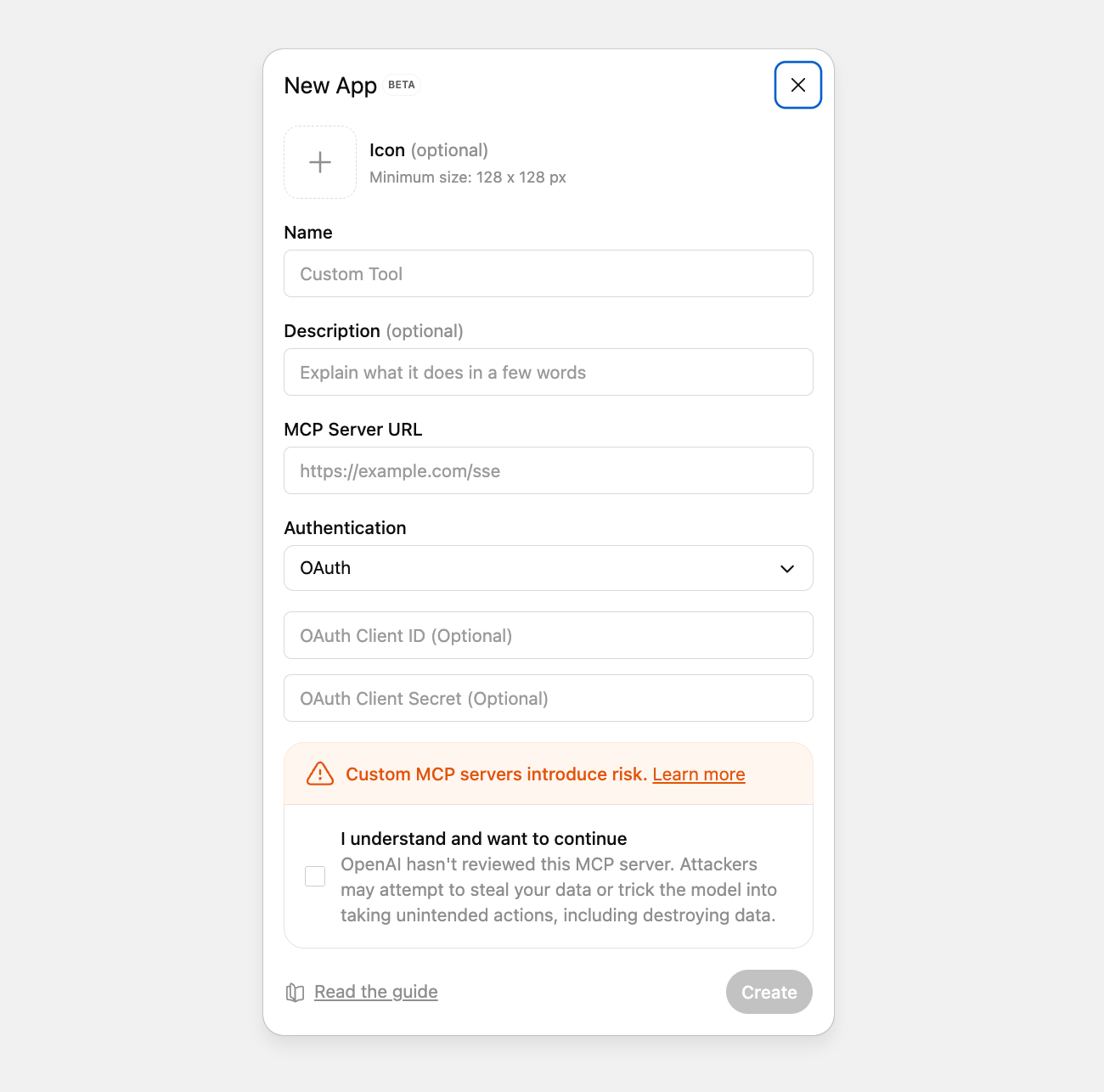
Create app. - Fill in the app details:
- Name: Use a clear name like Blnk MCP.
- MCP Server URL: Paste the MCP endpoint URL from the previous step.
- Authentication type: Select OAuth, then enter your Client ID and Client Secret.
- Click
Create. - Sign in with Blnk Cloud when prompted.
- After login, ChatGPT returns with the MCP app configured.
4
Start chatting with your ledger
You can now query, explore, and update Blnk data from your assistant.
What you can ask
-
Monitor activity
- “Show me all transactions from the last 24 hours”
- “What changed since yesterday?”
-
Check balances
- “What is the current balance for wallet bln_wallet_456?”
- “Show me all negative or low balances”
-
Investigate issues
- “Find failed or voided transactions”
- “Get the transaction with reference order_456”
-
Review large movements
- “Show all USD transactions over $5,000”
- “List unusually large transactions today”
-
Answer operational questions
- “How much money moved today?”
- “What is the total balance across all customer wallets?”
-
Query the lake (archived data)
- “Show the lake schema, then count APPLIED transactions last month”
- “Save a rolling 30-day currency breakdown query and schedule it daily”
-
Operate Core workflows
- “Create a balance monitor that alerts when this wallet goes below 1000”
- “Bulk commit these inflight transactions”
- “Start a reconciliation with this matching rule”
Supported tools
Blnk MCP registers 74 tools: 4 ledgers, 14 balances, 13 transactions, 10 identities, 3 search, 4 filters, 7 reconciliation, 5 hooks, 1 metadata, 2 system, and 11 lake.- Ledgers
- Balances
- Transactions
- Identities
- Search
- Filters
- Reconciliation
- Hooks
- Metadata
- System
- Lake
create_ledger- Create a new ledger for organizing balancesget_ledger- Retrieve ledger details by IDlist_ledgers- List all ledgersupdate_ledger- Update the name of an existing ledger
create_balance- Create a balance within a ledgerget_balance- Retrieve balance details by IDlist_balances- List all balancesget_balance_by_indicator- Retrieve a balance by its indicator and currencytake_balance_snapshots- Start daily balance snapshotsget_historical_balance- Get a balance as of a timestampget_balance_lineage- Get fund lineage for a balanceupdate_balance_identity- Link or change the identity on a balancecreate_balance_monitor- Create a balance monitor that fires when a condition is metget_balance_monitor- Retrieve a balance monitor by IDlist_balance_monitors- List all balance monitors on the instancelist_balance_monitors_by_balance- List balance monitors for a specific balanceupdate_balance_monitor- Update an existing balance monitordelete_balance_monitor- Delete a balance monitor by ID
record_transaction- Record a transaction between balancesget_transaction- Get a transaction by IDget_transaction_by_reference- Get a transaction by its unique referencelist_transactions- List transactions on the instancecommit_inflight- Commit an inflight transaction to finalize itvoid_inflight- Void an inflight transaction to cancel itbulk_commit_inflight- Commit multiple independently created inflight transactionsbulk_void_inflight- Void multiple independently created inflight transactionsrecover_queued_transactions- Recover stuck queued transactionsrefund_transaction- Create a refund for a transactionschedule_transaction- Schedule a transaction for future executionbulk_transactions- Create multiple transactions in one requestget_transaction_lineage- Get fund lineage for a transaction
create_identity- Create a new identity (individual or organization)get_identity- Retrieve identity details by IDlist_identities- List all identitiesupdate_identity- Update an existing identitydelete_identity- Delete an identitytokenize_field- Tokenize one PII field on an identitytokenize_identity- Tokenize multiple PII fields on an identitydetokenize_field- Detokenize one PII field on an identitydetokenize_identity- Detokenize multiple PII fields on an identityget_tokenized_fields- List which fields are tokenized on an identity
search- Search across transactions, ledgers, balances, or identitiesstart_reindex- Start a Typesense reindexget_reindex- Get Typesense reindex progress
query_transactions- Query transactions with advanced filtersquery_balances- Query balances with advanced filtersquery_ledgers- Query ledgers with advanced filtersquery_identities- Query identities with advanced filters
upload_reconciliation_data- Upload external reconciliation data (CSV or JSON)create_matching_rule- Create a reconciliation matching ruleupdate_matching_rule- Update a reconciliation matching ruledelete_matching_rule- Delete a reconciliation matching rulestart_reconciliation- Start a batch reconciliation runstart_instant_reconciliation- Start instant reconciliation with inline external transactionsget_reconciliation- Get reconciliation run status and results
create_hook- Register a transaction hookupdate_hook- Update a hookget_hook- Get a hook by IDlist_hooks- List hooksdelete_hook- Delete a hook
update_metadata- Add or update metadata on a ledger, balance, transaction, or identity
get_health- Check Core server healthget_metrics- Read Core Prometheus metrics
lake_schema- Get lake resources and columns for writing SQLlake_query- Run SQL against archived lake data (or a saved query)list_lake_queries- List saved lake queries for this instanceget_lake_query- Get a saved lake query by IDcreate_lake_query- Create a saved lake query (does not execute it)update_lake_query- Update a saved lake query you own (or as admin)delete_lake_query- Delete a saved lake query you own (or as admin)list_lake_query_runs- List recent lake query runsget_lake_query_run- Get a lake query run by IDput_lake_query_schedule- Create or update a cron schedule for a saved query you own (or as admin)delete_lake_query_schedule- Delete the schedule for a saved lake query you own (or as admin)
Response
Blnk MCP follows the Model Context Protocol specification. Request and response formats, session lifecycle, transport, and error handling are defined by the MCP standard. Most MCP clients handle the protocol automatically. If you are building a custom client, refer to the MCP specification for message structure, initialization, and tool invocation.Need help?
We are very happy to help you make the most of Blnk, regardless of whether it is your first time or you are switching from another tool. To ask questions or discuss issues, please contact us or join our Discord community.Was this page helpful?
⌘I
{
"mcpServers": {
"blnk": {
"url": "https://api.cloud.blnkfinance.com/mcp/YOUR_INSTANCE_ID",
"headers": {
"X-blnk-key": "CLOUD_API_KEY"
}
}
}
}